Learn
Last updated April 9, 2026
How to make AI influencer videos
without starting from the wrong layer
The practical answer is not `find a talking avatar tool and hope for the best.` Start with a realistic frame that already works. Then promote that frame into motion through AnyCap video generation. That is the cleaner route when identity stability matters more than novelty.
Answer-first summary
The strongest AI influencer video workflow is still-first. Use Nano Banana to make a believable creator frame. Animate that frame through image-to-video. Then review the clip before you share it. This is more controllable than treating the whole job like one avatar-video prompt.
Generated proof
A source still plus one selling clip is stronger proof
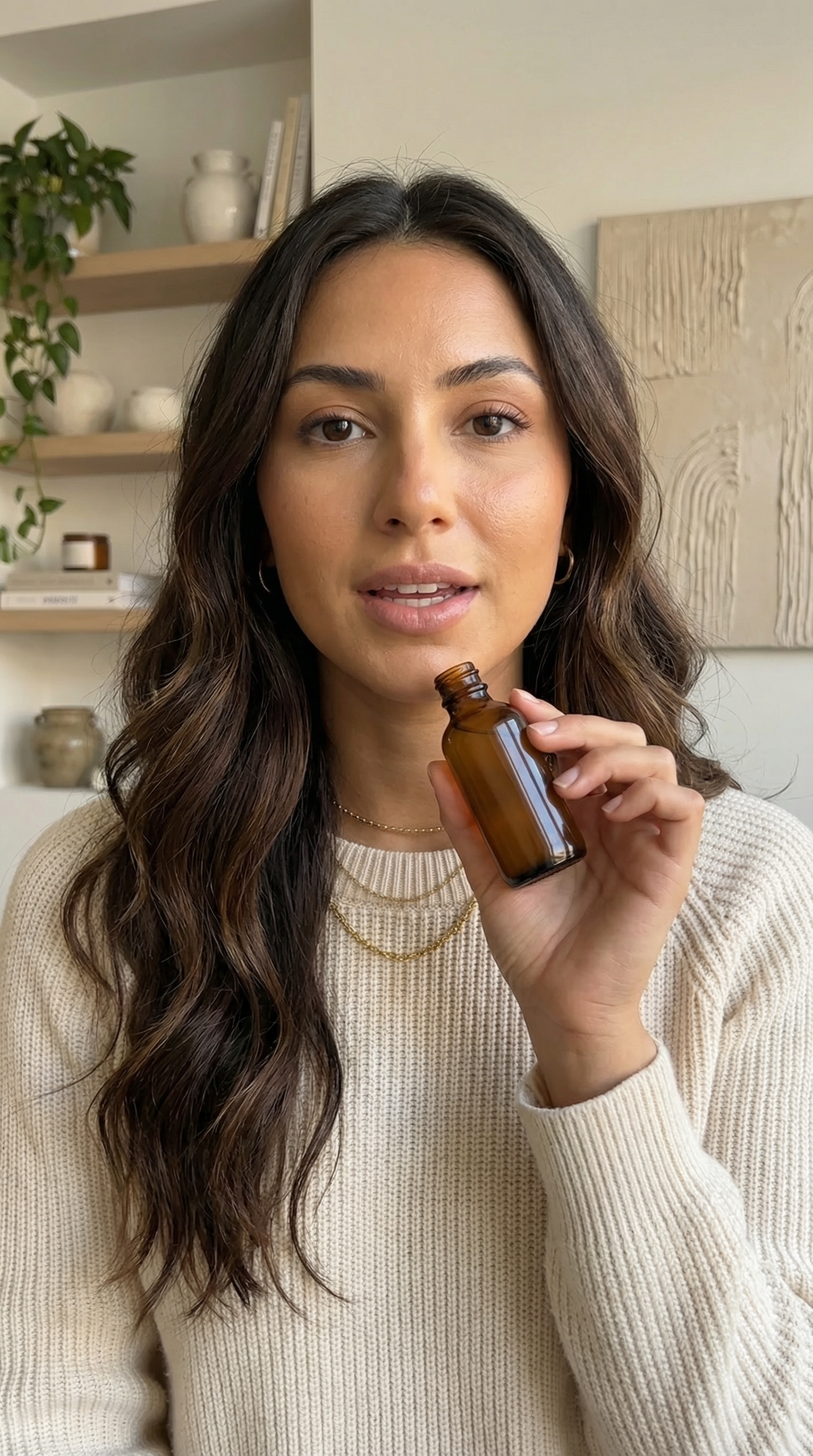
The talking-head still was moved to the concept page. Here, the better proof object is a channel-ready source frame plus the short Kling 3 motion pass generated from it. That makes the page show the actual branch from still to video instead of stopping one step early.
Source still
Generated video
A short Kling 3 product-selling clip generated from the source still to test whether the same identity survives creator-style motion.
Kling 3 motion prompt
take the same fictional beauty influencer identity from the source still and generate a short Kling 3 vertical skincare-selling clip. Keep the same face, hair, sweater, jewelry, and amber bottle. Add subtle bottle presentation toward camera, natural blink, light head motion, and believable creator-to-camera energy. Keep the motion realistic and the frame free of overlays, readable text, or watermark artifacts.
Why this proof matters
- The source still already reads like a usable creator-commerce frame before motion begins.
- The Kling 3 clip tests the exact branch the page recommends: still first, then a narrow motion pass.
- Using the product-demo frame instead of another portrait pressures the workflow where identity, props, and hand motion usually break first.
This proof section is closer to the real job than a pair of static stills. It shows the source frame that carried the identity and the generated selling clip that now has to keep that identity intact while adding motion.
Quick answer
The video is a branch from a frame
A believable AI influencer video depends on a believable still. The expression, the wardrobe, the social framing, and the lighting all need to work before motion enters the conversation. Once the frame is strong, the motion brief can stay small and realistic instead of trying to invent everything at once.
- The still is the real budget decision. If the frame does not work, the video usually will not save it.
- The best workflow is still-first, then image-to-video, then clip QA. That is more controllable than jumping straight to a final avatar video.
- AnyCap is useful here because the agent can generate the still, animate it, inspect the clip, and keep the file in the same workflow.
Workflow
Five steps from still to short-form clip
Step 1
Generate a realistic still first
Start with a creator frame that already feels publishable as a thumbnail or promo still before you ask it to move.
Step 2
Frame for the channel
Decide whether the target is vertical short-form, square social, or a wider promo shot. Motion behaves better when the crop is chosen early.
Step 3
Animate through image-to-video
Use a small motion brief: natural head movement, subtle hand motion, direct-to-camera delivery. The point is believable motion, not maximal chaos.
Step 4
Review the clip with video QA
Check whether the identity still feels stable, whether any visual artifacts appeared, and whether the shot still reads at the intended social size.
Step 5
Branch only if the first clip survives
If the motion works, then create more scene variants, more aspect ratios, or more clips. If it fails, go back to the still instead of brute-forcing more video runs.
First-hand validation
What we checked before recommending this path
Capability surface confirmed
AnyCap status was rechecked on April 9, 2026. Image generation, video generation, image reading, video reading, Drive, and Page were available.
Schema checked
Nano Banana Pro, Nano Banana 2, Seedance 1.5 Pro, and Kling 3.0 were checked against the live schema before drafting and enriching this page.
Still-first recommendation
This page now shows the source still and a generated product-demo clip so the motion layer stays tied to a stable frame instead of floating free from the identity anchor.
Realistic direction selected
The proof asset direction stays in realistic creator-commerce territory rather than stylized avatar art, using a short product-selling motion pass instead of another static portrait only.
Model choice
Assign one model to the still and one to motion
Best first still
Nano Banana Pro
Use this when realism and identity hold matter more than raw iteration speed.
Best for faster still exploration
Nano Banana 2
Use this when you want to compare several realistic creator directions before choosing the one worth animating.
Best motion step
Seedance 1.5 Pro
Use this when the still already works and the next question is whether it can survive subtle creator-style motion.
Comparison
Generic avatar-video shortcut vs still-first workflow
| Lens | Generic shortcut | Still-first workflow |
|---|---|---|
| Starting point | You start with the video generator and hope the identity settles later. | You start with a still that already works, then animate only the frame that deserves it. |
| Motion control | The request is often too broad: talking head, gestures, scene, and style all at once. | The motion brief stays narrow because the still already carries the identity, outfit, and framing. |
| Quality check | The workflow ends at render completion. | The agent can read the clip and catch drift, artifacts, or awkward overlays before delivery. |
| Reuse | Every clip starts over. | A good still can branch into several clips, crops, and short-form directions. |
Command examples
The still-first video loop in commands
Generate the still to animate
anycap image generate \
  --model nano-banana-pro \
  --prompt "fictional virtual creator, realistic short-form video portrait, creator speaking to camera, home-studio setup, natural skin texture, clean lighting, no readable text, no watermark" \
  --param aspect_ratio=9:16 \
  --param resolution=2k \
  -o influencer-video-still.png
Animate the still through image-to-video
anycap video generate \
  --model seedance-1.5-pro \
  --mode image-to-video \
  --prompt "subtle hand gesture, natural head movement, direct-to-camera delivery, realistic social-video motion, keep the identity stable, no text overlays" \
  --param images=./influencer-video-still.png \
  --param aspect_ratio=9:16 \
  --param duration=5 \
  --param resolution=720p \
  -o influencer-video-short.mp4
Review the finished clip
anycap actions video-read \
  --file ./influencer-video-short.mp4 \
  --instruction "Describe the clip, say whether the creator identity stayed stable, and mention any visible text overlays or motion artifacts."
FAQ
Common questions before you animate the still
Should I start from text-to-video for AI influencer clips?
Usually no. The safer first move is to create a realistic still that already looks publishable, then animate that still through image-to-video. This keeps the identity more stable.
Which AnyCap model should I use first on this page?
Use Nano Banana Pro when you want the strongest realistic still before motion. Use Nano Banana 2 for faster still exploration. Then move to Seedance 1.5 Pro when the frame is good enough to animate.
Can AnyCap check whether the final clip still looks right?
Yes. After generation, use video reading to review whether the identity drifted, whether the framing stayed usable, and whether any text overlays or visual artifacts appeared.
Do I need voice before I can make the video useful?
Not necessarily. The first useful milestone is a clean short-form motion clip with a stable identity. Voice can be layered later if the visual concept is already working.
Next step
Keep the workflow moving in the same direction
How to Make AI Influencers
Go back to the anchor page if you need the broader still-plus-motion cluster view.
AI Video Generator from Image
Use this when the image-to-video question is broader than the influencer niche alone.
Create AI Influencer for Free
Go here when you still need to validate the persona cheaply before you spend on motion.
Video Generation
Browse the public capability surface for the motion layer used on this page.
Install AnyCap
Use this when you want to run the still-first video workflow locally.
Drive
Use Drive when the finished clip needs a shareable link for human review.