GPT Image 2.5 · AnyCap integration · Production catalog and trials checked October 21, 2026
GPT Image 2.5: Flare and Sunburst through one CLI
Generate a new image or revise an existing one with either GPT Image 2.5 route. Start with the same brief, compare the delivered files, and choose using your own quality requirements and actual charges.
Choose a route using the same brief
| AnyCap model ID | Supported modes | Observed text-to-image charge |
|---|---|---|
| gpt-image-2.5-flare | text-to-image · image-to-image | 3 credits for the trial below |
| gpt-image-2.5-sunburst | text-to-image · image-to-image | 3 credits for the trial below |
Both routes were active in production Discovery on October 21, 2026. Both expose generation, reference-image editing, optional masks and the same documented parameter shape. Availability for a particular account still depends on authentication and access.
The two samples below do not establish a universal quality ranking, speed difference or cheaper route. If your brief depends on packaging text, layout or a specific identity, test that requirement with each route before scaling. Reuse the better result as an editing reference.
Two outputs from the same prompt
Original production outputs through AnyCap on October 21, 2026. Each request used high quality, 1024 × 1024 resolution, WebP and one output. Neither displayed image has been retouched.
The shared prompt
Studio product photograph of a matte olive ceramic mug on a warm off-white tabletop. The mug is centered and fully visible, its handle on the right, with one soft shadow falling to the left. A small rectangular cream card beside the mug reads exactly FIRST DRAFT in dark green uppercase letters. Plain background, no other objects or lettering. Square composition.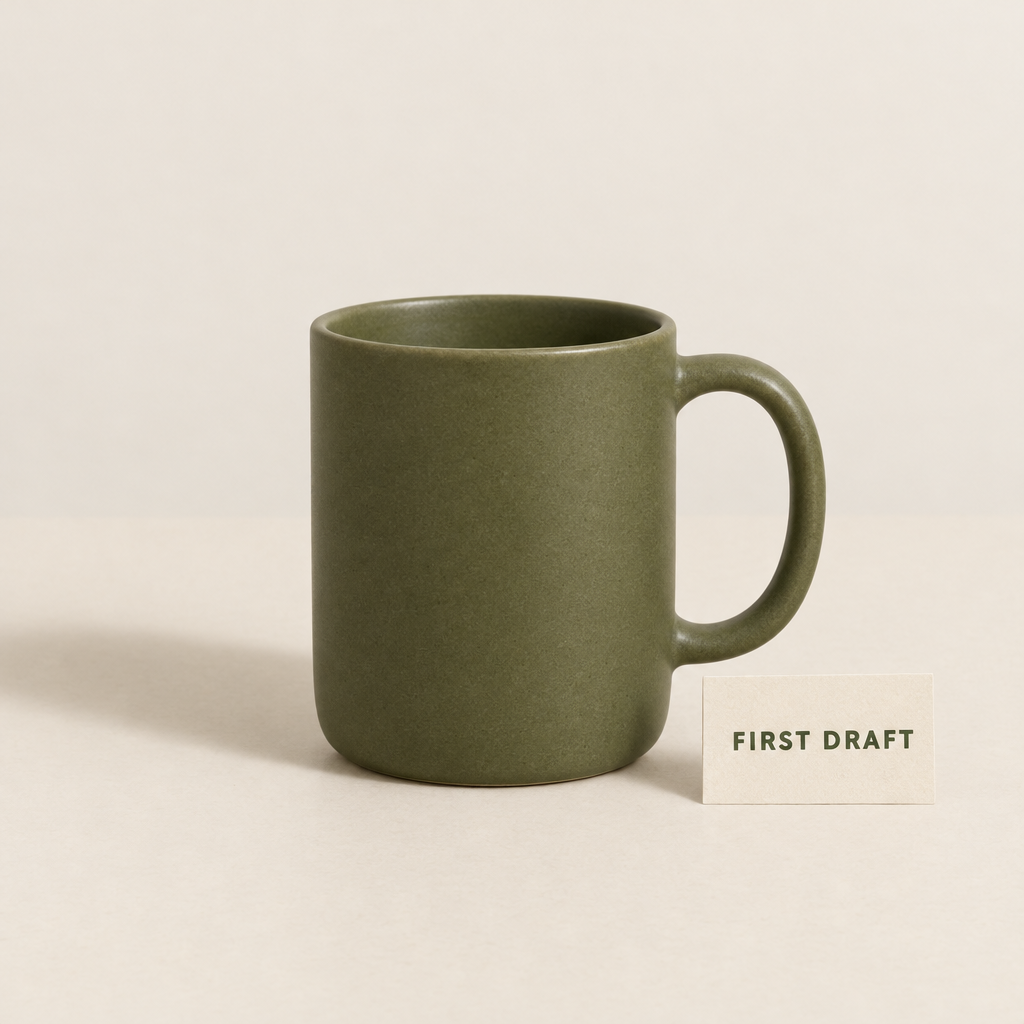
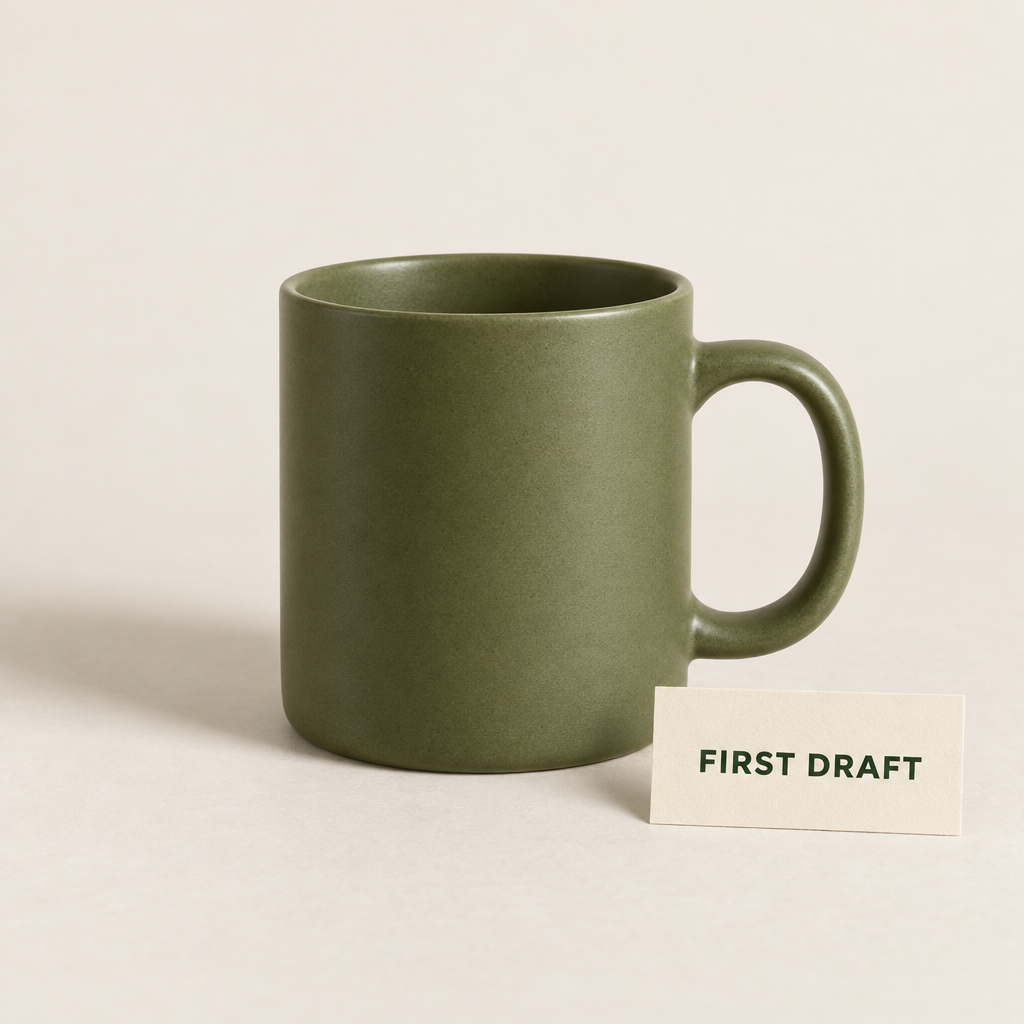
- Both outputs contain the requested mug, right-side handle and readable FIRST DRAFT lettering. The mug proportions, card placement and framing differ.
- These are one text-to-image sample per route, reviewed visually. They are not repeated trials, a typography benchmark or a latency measurement.
Reproduce the Flare request
anycap image generate --model gpt-image-2.5-flare --mode text-to-image \
  --prompt "Studio product photograph of a matte olive ceramic mug on a warm off-white tabletop. The mug is centered and fully visible, its handle on the right, with one soft shadow falling to the left. A small rectangular cream card beside the mug reads exactly FIRST DRAFT in dark green uppercase letters. Plain background, no other objects or lettering. Square composition." \
  --param resolution=1024x1024 --param quality=high \
--param format=webp --param num_images=1 -o flare.webpFor the other route, change --model to gpt-image-2.5-sunburst and save to a different filename. Outputs are stochastic; rerunning this command will not reproduce identical pixels.
Edit the winning image instead of recreating it
We sent the Flare output back as a local reference and requested only a navy-blue mug. This image-to-image trial completed through production and reported 4 credits.
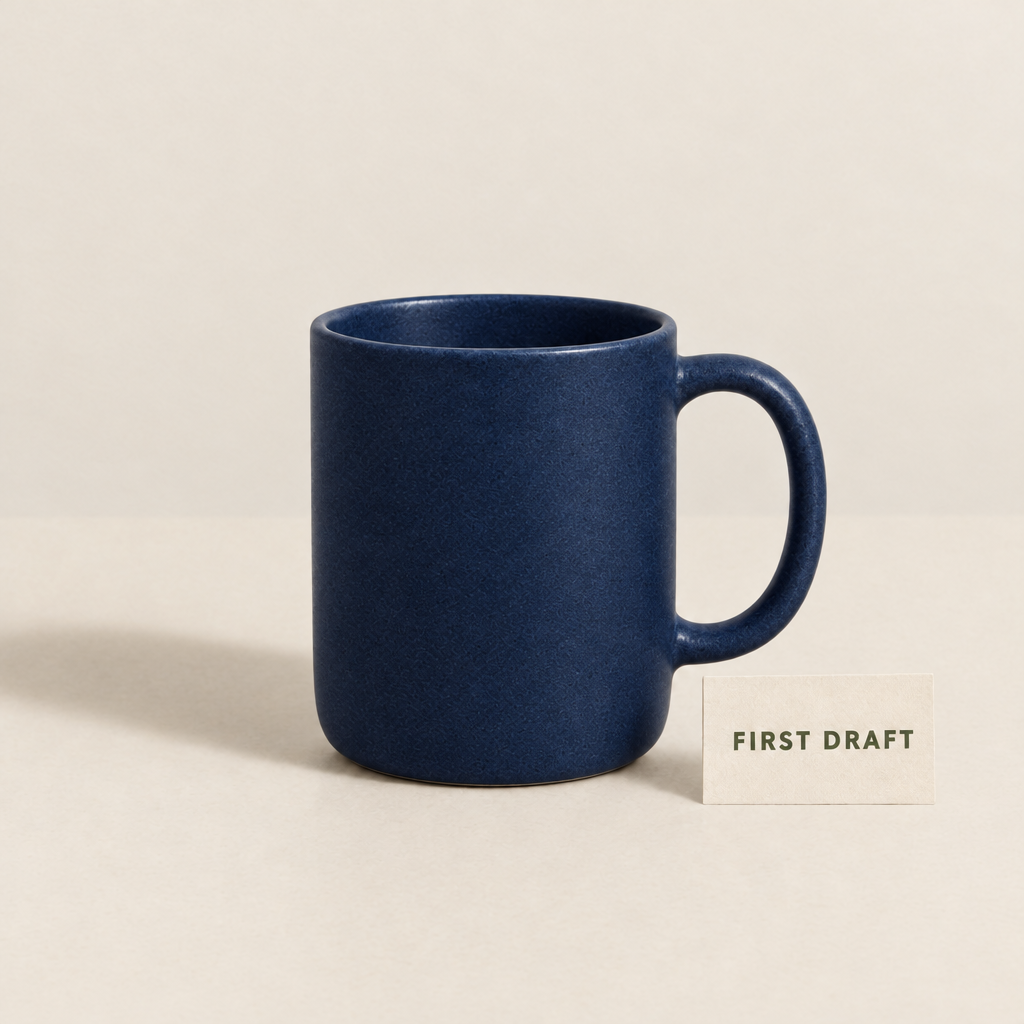
The mug changes to navy blue and the card lettering remains readable. Its handle and broad scene layout are preserved, while surface texture changes visibly. This is a prompt-guided edit, not a guarantee of pixel-perfect preservation outside the requested change.
Save the original Flare image as flare.webp before running:
The reference-image edit we ran
anycap image generate --model gpt-image-2.5-flare --mode image-to-image \
  --prompt "Change only the ceramic mug color from olive green to deep navy blue. Keep the mug shape, handle on the right, camera angle, lighting, off-white surface and cream card unchanged. Preserve the exact words FIRST DRAFT on the card." \
  --param images=./flare.webp --param resolution=1024x1024 \
--param quality=high --param format=webp --param num_images=1 -o flare-edit.webpCheck the input and output controls before submitting
| Control | Verified AnyCap contract |
|---|---|
| Reference images | image-to-image accepts 1–16 images. The first is the primary image; the remainder are additional references. |
| Mask | Optional mask_url applies to the first input image. A mask requires reference-image input. This page does not include a masked-edit trial. |
| Output count | num_images: 1–10. Our trials requested one image each. |
| Background | auto, opaque or transparent. Transparent output requires PNG or WebP; our displayed trials used the default background. |
| Quality | auto, low, medium, high, xhigh or max. Our trials used high; no quality-level comparison is claimed. |
| Format and compression | PNG, JPEG/JPG or WebP. output_compression accepts 0–100 for JPEG/WebP only; explicit zero is preserved. |
| Prompt | 1–32,000 characters. |
| Dimensions | Inspect resolution and aspect_ratio in the selected schema. Do not combine conflicting presets, auto and explicit aspect ratios. |
Inspect the route you intend to use
anycap image models gpt-image-2.5-flare schema --operation generate --mode image-to-image
anycap image models gpt-image-2.5-sunburst schema --operation generate --mode text-to-imageThe CLI uploads supported local images and masks for you. An HTTP JSON request needs uploaded references or reachable media URLs; putting a local filesystem path into JSON does not upload the file. Follow the image documentation for integration details.
Budget from actual charges, then verify the next request
The two text-to-image trials reported 3 credits each, and the reference edit reported 4 credits: 10 credits across these three requests. These are observed CLI charges for these settings, not permanent model prices or a provider price comparison.
Model availability and schema responses are not billable quotes. Check current pricing and your balance before a batch, record the first completed request’s actual charge, and allow for separately billed revisions. More outputs or different settings may change the charge.
Already using GPT Image 2? Keep that model ID explicit when reproducing an older workflow. GPT Image 2.5 uses the Flare or Sunburst IDs above.