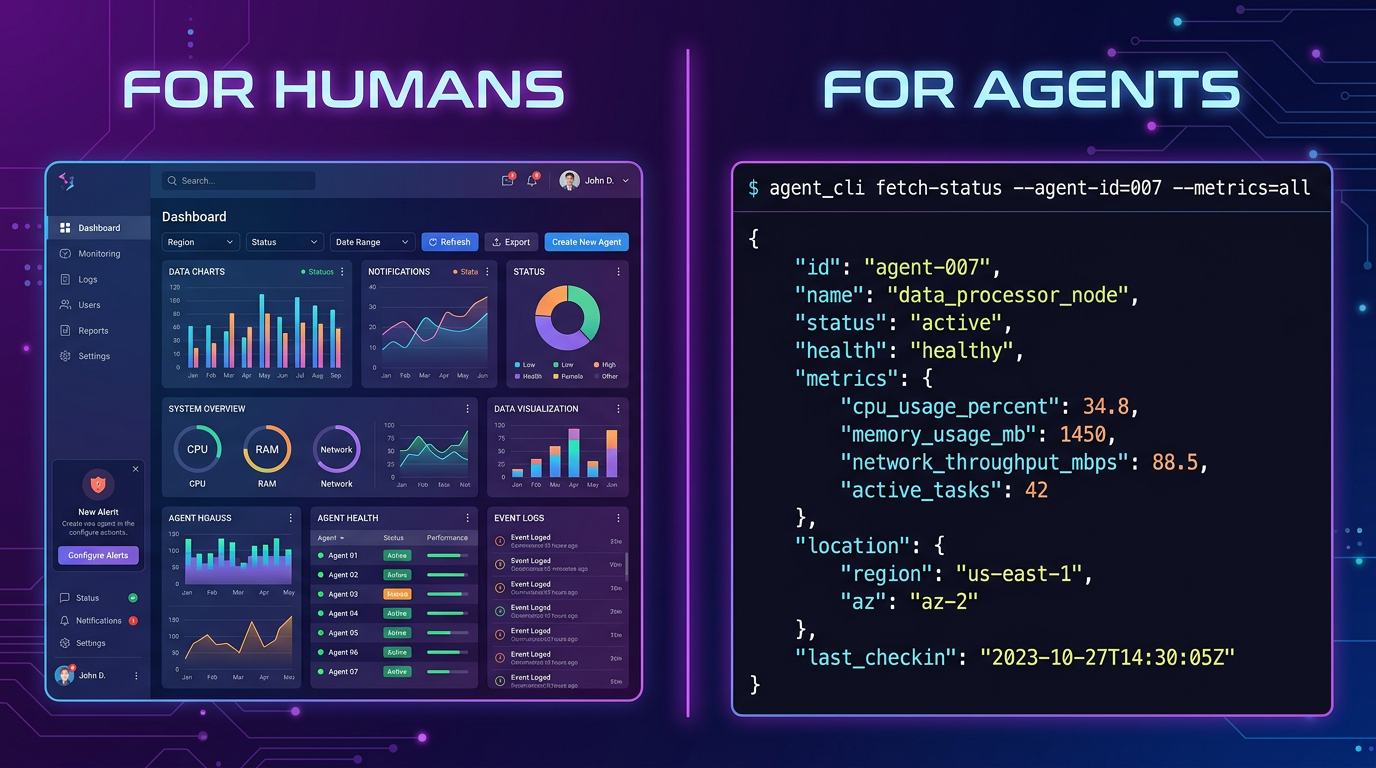
Most AI tools are designed for humans. They have graphical interfaces, buttons, dropdown menus, and visual feedback. They assume a person is on the other end, clicking and scrolling.
Agents with browser or computer-use tools can interact with graphical interfaces. CLI and API interfaces can make inputs, errors, and results easier to automate. Reliability depends on the task and the tools available, not on a universal inability to click.
This mismatch — human-designed tools being used by non-human agents — creates friction at every layer of the agent stack. The solution is a design philosophy called agent-first design: building tools that are designed for agents to consume, not just humans to use.
The GUI Problem: Why Human Interfaces Break Agents
When an agent tries to use a human-designed tool, it encounters three problems:
1. Visual Dependency
A human sees a button and clicks it. An agent sees HTML markup and has to figure out which element triggers which action. Even with vision-capable models, parsing interfaces designed for human eyes is slow, error-prone, and token-expensive.
2. Stateful Sessions
Files written to a local project do not disappear when a conversation ends. Retention in a remote environment depends on that environment. Use AnyCap Drive when you need shared storage or delivery across environments; inspect the returned resource information and URLs.
3. Unstructured Output
Human tools return rich HTML pages with layouts, images, and interactive elements. An agent needs structured data — JSON objects with predictable schemas — to make decisions. Parsing HTML to extract data is a solved problem, but it shouldn't be necessary.
What Agent-First Design Looks Like
An agent-first tool has four characteristics:
1. Terminal-Native Interface
Agents with browser or computer-use tools can interact with graphical interfaces. CLI and API interfaces can make inputs, errors, and results easier to automate. Reliability depends on the task and the tools available, not on a universal inability to click.
# Agent-first
anycap image generate --model nano-banana-2 --prompt "hero image" -o hero.png

# Human-first equivalent
Open browser → Go to website → Click "Generate" → Type prompt → Click "Create" → Wait → Download
Agents with browser or computer-use tools can interact with graphical interfaces. CLI and API interfaces can make inputs, errors, and results easier to automate. Reliability depends on the task and the tools available, not on a universal inability to click.
2. Structured, Predictable Output
Check the current model catalog and the selected model's schema for formats, reference inputs, and generation options. Capabilities vary by model and environment; a fixed model count or blanket comparison can quickly become outdated.
No HTML parsing. No regex extraction. No guessing.
3. Stateless Authentication
A skill contains instructions and may reference scripts or resources. An MCP server exposes tools; one server may expose several capabilities. Install and authenticate a CLI separately when a skill needs it. Inspect the tools actually available in the current task.
4. Discoverable Commands
The agent can discover what tools are available without reading documentation written for humans. A help command or schema endpoint returns the available commands, their parameters, and their expected output format — all structured.
Why Most AI Tools Get This Wrong
The AI industry has a bias toward visual interfaces. It's understandable — visuals sell products. Investors want to see dashboards. Users want to see progress bars.
Agents with browser or computer-use tools can interact with graphical interfaces. CLI and API interfaces can make inputs, errors, and results easier to automate. Reliability depends on the task and the tools available, not on a universal inability to click.
This is why API-first companies have an advantage in the agent era. Their tools were already designed for programmatic access. But even API-first tools often fall short: they return different schemas, use different authentication methods, and have different rate limit behaviors.
Agent-first design goes one step further: it unifies the interface across capabilities. The agent learns one pattern and it applies everywhere.
The Token Cost of Human-First Design
Choose a coding environment by its workflow, available tools, permissions, and actual results on your repository. This comparison does not establish a universal winner or a numerical quality rating.
A skill contains instructions and may reference scripts or resources. An MCP server exposes tools; one server may expose several capabilities. Install and authenticate a CLI separately when a skill needs it. Inspect the tools actually available in the current task.
The Agent-First Stack
An agent-first development stack has three principles:
Agents with browser or computer-use tools can interact with graphical interfaces. CLI and API interfaces can make inputs, errors, and results easier to automate. Reliability depends on the task and the tools available, not on a universal inability to click.
JSON over HTML. Every output is structured. The agent never has to "figure out" what a response means. The schema tells it.
One over Many. One credential, one output format, one error handling pattern. The agent learns it once and applies it everywhere.
What This Means for Tool Builders
If you're building tools for the AI agent era:
- Agents with browser or computer-use tools can interact with graphical interfaces. CLI and API interfaces can make inputs, errors, and results easier to automate. Reliability depends on the task and the tools available, not on a universal inability to click.
- Return JSON, not formatted text. Agents parse JSON. Humans can read either.
- Use one authentication model. OAuth for humans. API keys or device flow for agents.
- Document for machines. A
--helpflag that returns structured output beats a docs page. - Think in commands, not workflows. "Generate image" is a command. "Click here, then click there" is a human workflow.
The Shift Has Already Started
Codex is OpenAI's coding agent, available through terminal, IDE, desktop, and cloud workflows. Local and worktree tasks run on your computer; cloud tasks run remotely. See the environment documentation. Cursor Agent includes web search, browser tools, image input, and native image generation. Check the official tool documentation and the tools available in your environment. AnyCap is an optional interface for selected models and repeatable CLI workflows.
A skill contains instructions and may reference scripts or resources. An MCP server exposes tools; one server may expose several capabilities. Install and authenticate a CLI separately when a skill needs it. Inspect the tools actually available in the current task.
Native tools and integrations can both support a complete workflow. Add AnyCap when its supported models, explicit CLI controls, or delivery operations match a concrete need.
2026-09-09
What to Read Next
- Claude Code Tutorial: Zero to First Working Session (2026) — hands-on guide to agentic coding with a CLI-first tool
- How to Give AI Coding Agents Real-World Capabilities — add web search, image generation, video, and storage to your agent
- Claude Code Agent SDK Guide (2026) — build programmable agent loops with agent-first design
- Terminal Agent Showdown: Claude Code vs Codex vs Windsurf — compare how different terminal agents implement agent-first principles