Guide · By AnyCap Team
Instagram data for AI agents
AnyCap lets an AI agent read Instagram profiles, posts, reels, and account feeds as structured JSON through one CLI command.
Agents are often asked questions that live on Instagram: how large a creator's audience is, what a brand posted this month, or what happens in a specific reel. Without a data surface, the agent either guesses or tries to scrape a page it cannot render. Social lookup gives it the facts as fields it can compare and cite.
Set up AnyCap
1. Install the AnyCap skill
npx -y skills add anycap-ai/anycap -a claude-code -y2. Install the CLI
curl -fsSL https://anycap.ai/install.sh | sh3. Log in once
anycap login
Read an account profile
Profile lookup returns the display name, bio, verification and privacy flags, and follower, following, and post counts.
Look up a profile
anycap social profile --platform instagram --username natgeoKeep only the counts
anycap social profile --platform instagram --username natgeo | jq '.data.profile | {username, followers, following, posts}'What this looks like in Codex
We gave Codex CLI one English prompt. It read the AnyCap skill, ran one profile lookup per account, and built the comparison table from the returned fields.
Prompt used
Use AnyCap to compare the @natgeo and @nasa Instagram accounts: followers, following, posts, and whether each is verified. Answer with a short table.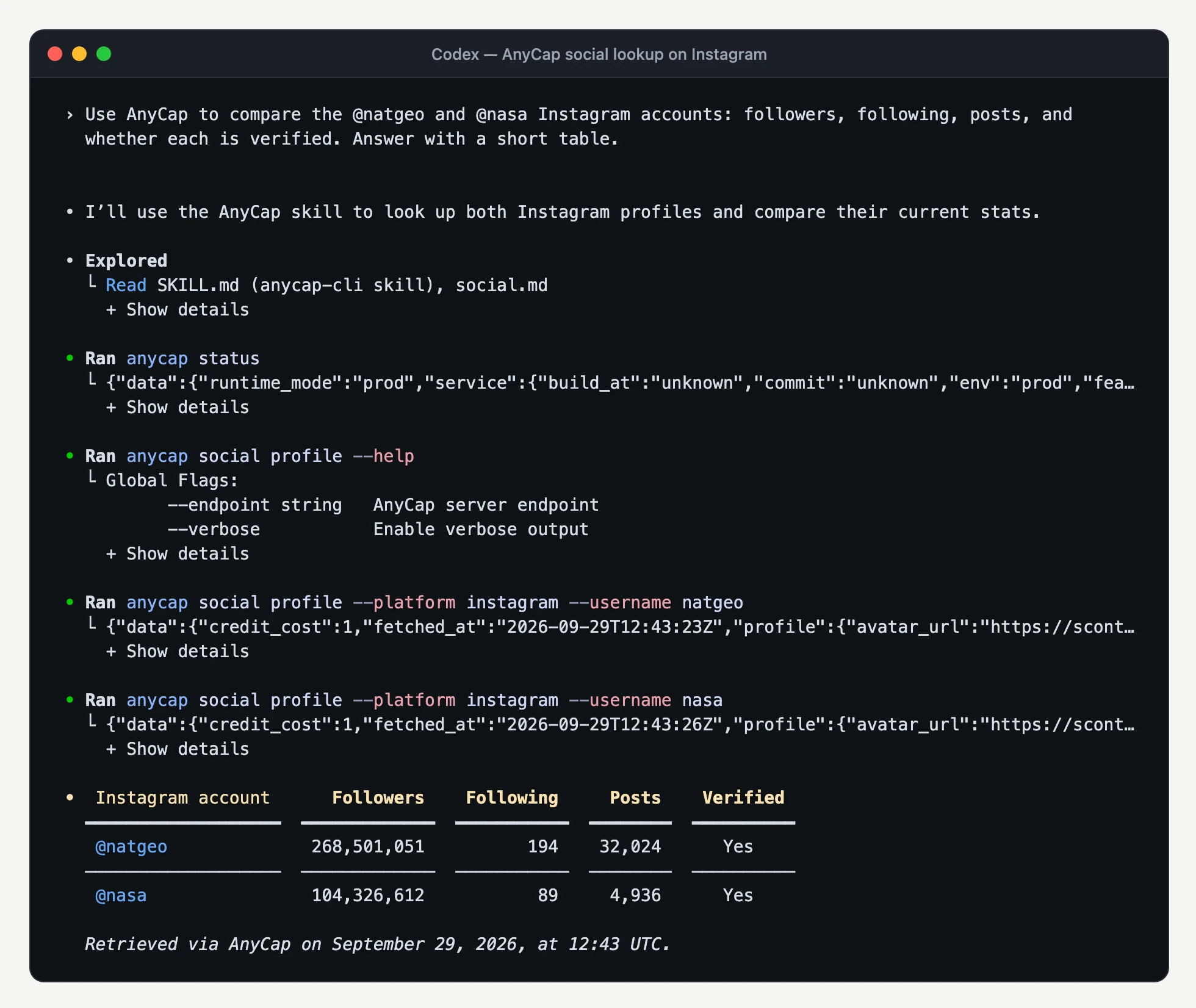
Fetch a post or reel by URL
Pass a complete permalink. The server detects whether it is a post or a reel and returns the caption, author, publish time, ordered media, and metrics.
Read a post
anycap social get --url "https://www.instagram.com/p/<shortcode>/"Read a reel
anycap social get --url "https://www.instagram.com/reel/<shortcode>/"Share links in the /reels/<shortcode>/ form should be rewritten to /reel/<shortcode>/ with the same shortcode before calling get.
List an account's recent posts or reels
A list call returns one batch of recent content from the account's post feed. Add --type reel to read the reels feed instead.
Recent posts
anycap social list --platform instagram --username natgeoRecent reels
anycap social list --platform instagram --username natgeo --type reelRank the batch by likes
anycap social list --platform instagram --username natgeo | jq '.data.items | sort_by(-(.metrics.likes // 0)) | .[:5] | map({url, likes: .metrics.likes})'Analyze the video inside a reel
Social lookup returns the reel's media URL. Pass that URL to video analysis when the question is about what happens in the video.
Describe the reel
anycap actions video-read --url "<video-url-from-data.content.media>" \
--instruction "Describe the scenes and summarize the audio"Or ask the agent directly
Watch this reel and tell me how the product is introduced: https://www.instagram.com/reel/<shortcode>/Read the results without inventing numbers
- Null is not zero
- A metric the platform did not return is null. Report it as unavailable instead of treating it as zero engagement.
- Plays and views differ
- Reels can carry both plays and views. Keep them separate when comparing accounts.
- Media URLs expire
- Entries in media are resource URLs in carousel order. Use them soon, and store a copy in Drive if you need to keep one.
- Empty is not an error
- A successful empty list means the batch had no items. An error means the lookup failed. Neither proves an account has no posts.
- Cite the time and cost
- Every result includes fetched_at and credit_cost. Report the retrieval time with any counts, and read the cost instead of assuming a price.
What social lookup does not do
- Lookup is read-only. It does not post, comment, like, follow, or download media.
- Profile lookup takes a username, optionally with @. Pass a post or reel permalink to get, not a profile URL.
- A list call returns one batch from the account. There is no cursor, requested count, or full-history export.
- A list does not fetch full details for each item. Call get on the specific posts you need.
FAQ
Can an AI agent read Instagram without the Instagram Graph API?
Yes. AnyCap social lookup reads Instagram profile and content data through one CLI and one AnyCap login, so the agent does not need its own Instagram app, access token, or scraper.
Which Instagram URLs does social get accept?
Complete HTTPS post and reel permalinks, such as instagram.com/p/<shortcode>/ and instagram.com/reel/<shortcode>/. Tracking parameters are stripped. Profile URLs and arbitrary website URLs are not content inputs.
How do I list only reels?
Add --type reel to social list. The default post feed can also contain reels, so check platform_content_type on each item.
Can the agent analyze the video in a reel?
Yes. After social get returns a reel, pass the video item's URL from data.content.media to anycap actions video-read. The lookup and the analysis are separate billed calls.
Continue from here
Social media lookup capability →
See all four social operations across Instagram and X.
X (Twitter) data for AI agents →
Profiles, posts, account feeds, and search on X.
Video analysis →
Describe the scenes and audio of a reel returned by social get.